
Acrobat Protected Mode Mac
This info was updated 2 September 2026. It applies only to Mac users, not to Windows.
Summary
In August 2026, we expect Adobe to switch to using Protected Mode in Acrobat on Mac systems with no way to switch it off. Protected Mode locks out many things in Acrobat that used to be possible. This will affect all users who allow Acrobat to auto-update, or who make a new install. This changes things radically for plug-ins and you will need Quite Imposing Plus 6.0f or later. Earlier versions may refuse to work, or fail with many different errors. If you have a V6 license this will be a free upgrade.Acrobat version 2026.022.21869, released on 31 August 2026, appears to make this change. We cannot be sure at this time of Adobe's intentions as this is not mentioned in the Acrobat release notes.
Setting up for protected mode
First make sure you are using 6.0f or later. You will need to go through a quick setup for Protected Mode, and you may be asked to repeat this (for example if Acrobat is reinstalled or migrated). You will see a prompt very similar to an Open dialog to allow access to the Quite settings folder.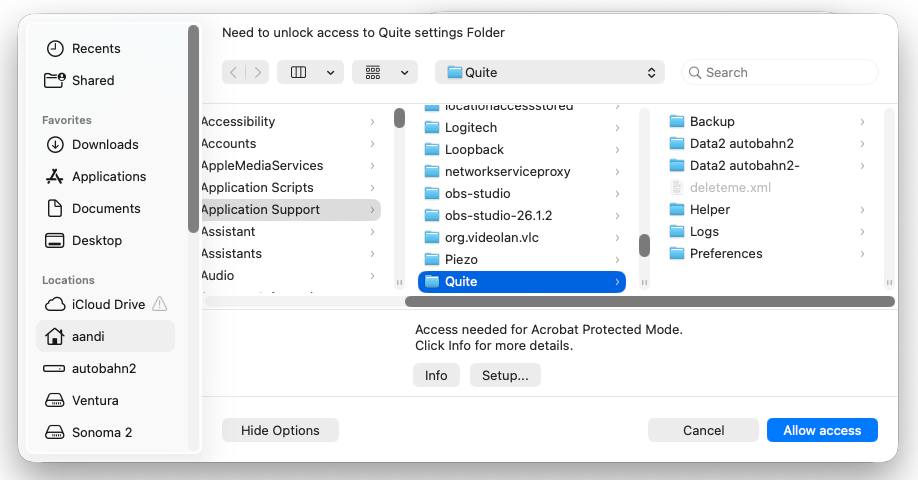
Allow access prompts
In protected mode, Acrobat automatically blocks access to most files. If Acrobat needs to read a file that you used before – for example a page used as a background – you will see a similar prompt. You need to choose Allow access. Don't click on any different file or folder, you have to allow access to that specific Quite folder. (Prompts may vary).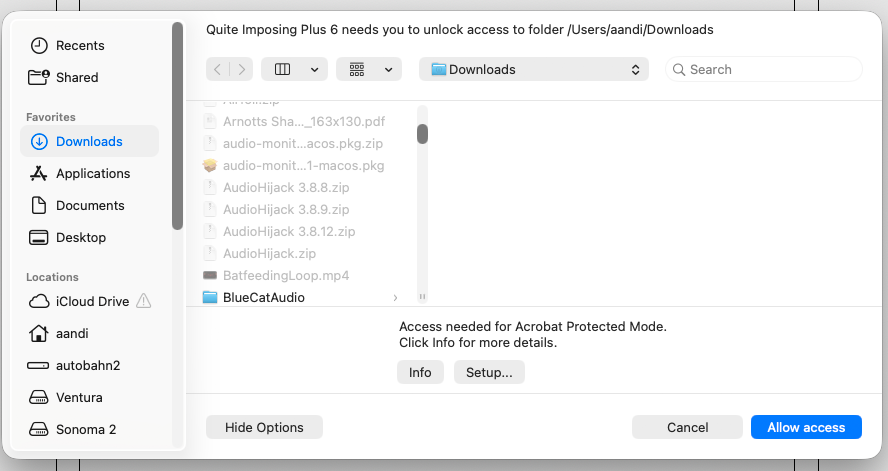
So long as you are expecting this access, you can allow it. Allow access automatically unlocks access to all files in that folder, until Acrobat is restarted. Note that Acrobat will unlock access for ALL plug-ins together, not just Quite Imposing Plus, and currently it also includes all subfolders. (Acrobat or the system might change this). Sometimes the Mac system will add extra prompts to access files; these are not under our control.